Minh's Free PhotoResizer 1.8
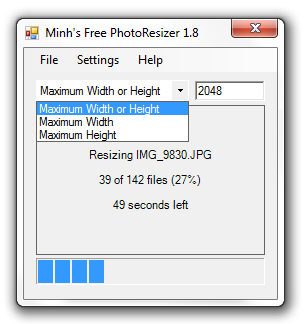
Need to batch resize photos on Windows? This is a very simple utility to allow you to batch-resize digital photos. You simply
indicate your maximum width or height in pixels and drag and drop your images (or
folder containing images) onto the window. The program will then batch-resize all
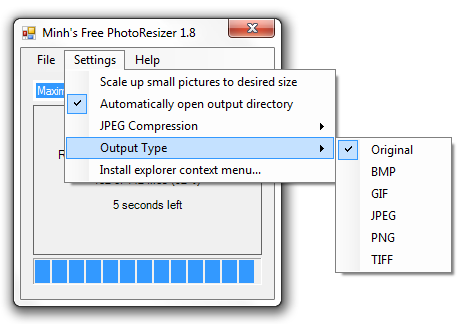
images into a subfolder. It can't get any easier than that. You can also choose
the output file type and install shell extensions so that you can right-click on
any photo in Windows Explorer and resize from there.
Version history
Version 1.8 (January 17th 2013)
- Added ability to decide on whether to resize always by width, always by height or by whatever is shorter/larger
- Minor bug fixes
Version 1.7 (November 11th 2012)
- Ability to automatically open output directory
- Minor UI tweaks to make it even more intuitive
Version 1.61 (July 5th 2010)
- Allows for choosing the output file type
- Extend support to TIFF, JPEG, BMP, GIF and PNG codecs (input as well as output)
Version 1.5 (October 24th 2009)
- Settings are now stored in registry
- Shell extensions allow you to right-click on an image/folder to resize with previous
settings
- Added Check for Updates
- Dragging lot of files into PhotoResizer will no longer lock up Windows Explorer
during the resizing process
- Renamed from "Minh's Stupid PhotoResizer" to "Minh's Free PhotoResizer"
Version 1.4 (December 20th 2008)
- Add option to skip scaling up pictures that are already smaller than the desired
size and copying them instead
- Add time to completion prediction
Version 1.3 (August 23rd 2006)
- Slightly faster JPEG saving algorithm
- Retains EXIF meta-data tags
Version 1.2 (March 8th 2006)
- Add support to set JPEG quality
Version 1.1 (Some time in 2003 or 2004)
- Upgraded to use .NET Framework 1.1
Version 1.0 (November 20th 2002)